Choose living room remote control storage ideas around three checks: reach from your usual seat, internal organizer size, and how easily each control returns to its place. Start with everyday remotes; keep occasional controls in a separate, identified location.
This is a planning guide. The tray example uses illustrative dimensions and does not claim a tested product or a completed home project.
Table of Contents
- Choose by reach and fit: tray sizing example
- 1. Use a Small Coffee Table Tray
- 2. Give Remotes a Dedicated Drawer
- 3. Add a Sofa Arm Remote Caddy
- 4. Use a Compact Remote Control Holder
- 5. Store Remotes in a Lidded Box
- 6. Create a Media Console Remote Zone
- 7. Use a Small Basket on a Shelf
- 8. Add Storage to a Side Table
- 9. Separate Everyday and Rarely Used Remotes
- 10. Label Similar Remote Controls
- 11. Create One Family Remote Station
- 12. Remove Remotes You No Longer Need
- How to Organize Remote Controls Step by Step
- Store Remotes and Batteries Safely
- Common Remote Control Storage Mistakes
- Frequently Asked Questions
- Choose one return point
Choose Remote Storage by Reach and Fit
Compare these living room remote control storage ideas from the seat where you use the controls. The nearest empty surface is not always the easiest place to retrieve and return them.
Scroll sideways to read the full table.
| Option | Use it when; reject it when |
|---|---|
| Open tray | Everyday controls need a visible home. Reject a position that requires leaning over drinks or moving decor each time. |
| Side-table drawer | You want a clear surface. Check that the drawer opens fully from the seated position and remotes can lie without stacked layers. |
| Sofa caddy | No table is within reach. Check the arm shape, pocket depth and whether the caddy slips as you sit or stand. |
| Slotted holder | Several similar remotes need separate places. Compare each slot’s internal width and depth with the thickest control. |
| Lidded box | You prefer concealed storage. Avoid a lid that must be cleared of other objects before it can open. |
Size a tray from the actual controls
Lay the everyday remotes side by side and measure their combined widths and the longest length. Add enough space to grasp each one comfortably. Check the organizer’s internal dimensions: its outside size includes the walls.
Illustrative calculation: three remotes are 4, 5 and 6 cm wide. You choose 1 cm between adjacent remotes and 1 cm at each outer edge. Planned internal width = 4 + 5 + 6 + 1 + 1 + 1 + 1 = 19 cm. If the longest remote is 21 cm and you choose 1 cm at either end, the planned inside length is 23 cm.
A tray advertised as 20 × 24 cm externally may still fail if its inside measurements are 18 × 22 cm. These gaps are invented preferences for the example, not universal clearances. Test the layout with your grip and controls before buying.
Separate storage from operating position
Taking a remote out of a box to use it is different from operating it through the closed box. Roku’s simple remote guidance says that model uses infrared and needs a direct line of sight. Do not assume the same behavior for every remote; check your model’s instructions and keep its signal path clear.
1. Use a Small Coffee Table Tray
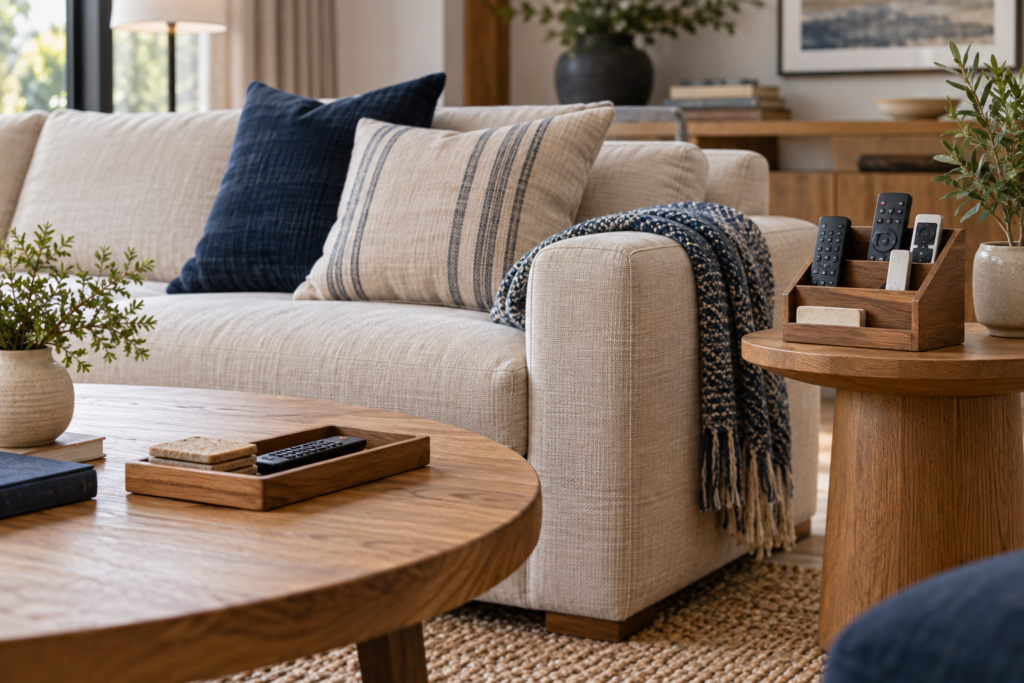
A compact tray is one of the easiest solutions when remotes are normally used from the sofa. It gives them a visible home without requiring new furniture or permanent installation.
Choose a tray that is only large enough for the remotes you use regularly. An oversized tray can quickly become a collection point for receipts, cables, keys, and other unrelated items.
If your coffee table also holds decorative objects, keep the remote tray separate so the functional storage remains obvious and easy to access.
2. Give Remotes a Dedicated Drawer
A coffee table, media console, or side table drawer can keep remote controls completely out of sight. This works particularly well in a living room where you prefer clear surfaces.
Dedicate one section of the drawer to remotes instead of allowing them to mix with chargers, paperwork, and miscellaneous household items.
A small drawer divider can stop the remotes from sliding around and can create a separate space for another frequently used accessory if necessary.
3. Add a Sofa Arm Remote Caddy
A sofa-arm caddy keeps remote controls close to the place where they are actually used. Many designs hang over the arm of a sofa or chair and provide several pockets.
This can be especially useful when there is no side table within easy reach. Use one pocket for remotes and reserve the others for genuinely useful items rather than filling every compartment.
Check the dimensions and material before choosing a caddy so it sits securely on your particular sofa and does not interfere with comfortable seating.
4. Use a Compact Remote Control Holder
A purpose-built remote holder can keep several devices upright in separate slots. Because each remote remains visible, you can quickly identify the one you need.
This option works well on a side table or media console when you use several remotes every day. Keep the holder near the main seating position rather than across the room.
Before buying one, measure your largest remote. Different streaming, television, and audio remotes can vary considerably in width and thickness.
5. Store Remotes in a Lidded Box
If visible electronics conflict with the look of your living room, a small decorative box provides concealed storage. Place it on the coffee table or another convenient surface and keep only remote controls inside.
The lid hides visual clutter while still making the devices accessible. However, avoid a box that requires several objects to be moved before it can be opened.
Convenience matters because storage that feels inconvenient is less likely to become part of the household routine.
6. Create a Media Console Remote Zone
If your television and entertainment equipment are organized around a media console, create one dedicated remote-control zone there.
A shallow drawer, small basket, or compartment can hold the television, soundbar, streaming-device, and other entertainment remotes together.
This arrangement is particularly useful for less frequently used remotes. If the main television remote is used constantly from the sofa, however, storing it across the room may be less practical than keeping it near the seating area.
7. Use a Small Basket on a Shelf
A small basket provides flexible storage when you do not have an available drawer. It can sit on a lower coffee-table shelf, media console, or nearby bookcase.
Choose a shallow basket so remotes remain easy to identify. Deep baskets encourage items to pile on top of one another and can turn a simple storage solution into another place to search.
For a coordinated appearance, choose a basket material that already fits your living room rather than introducing an organizer that visually dominates the space.
8. Add Storage to a Side Table
The side table next to your most-used seat is a natural remote-control location. If it has a drawer, dedicate part of it to remotes. If not, place a compact tray or holder on top.
The biggest advantage is convenience. You can use a remote and return it without standing up or reaching across the coffee table.
If your side table already attracts clutter, clear unrelated items before introducing remote storage. Adding another organizer to an overcrowded surface rarely solves the underlying problem.
9. Separate Everyday and Rarely Used Remotes
Not every remote deserves prime living-room space. You may use the main television and streaming remotes every day while touching another device remote only occasionally.
Keep everyday controls near the sofa and move infrequently used ones to a media-console drawer or labeled storage area. This reduces the number of devices sitting in your primary remote station.
The same principle works throughout an organized home: the easiest-to-reach storage should be reserved for the things you use most.
10. Label Similar Remote Controls
If several remotes look almost identical, a small discreet label can make them easier to distinguish. This is useful in homes with multiple televisions, streaming devices, or similar equipment.
Use a simple description such as “TV,” “Soundbar,” or the room name. Avoid covering buttons, sensors, battery compartments, or manufacturer information that you may need later.
Labels are particularly helpful when guests or several family members regularly use the entertainment system.
11. Create One Family Remote Station
A storage system works best when everyone knows where the remotes belong. Choose one clearly defined location and make it the household remote station.
It could be a coffee-table tray, sofa caddy, drawer, or holder. The exact organizer matters less than consistently returning remotes to it after use.
If your living room contains other frequently misplaced entertainment items, you can create nearby zones without mixing everything together. Our living room board game storage ideas offer additional ways to organize shared entertainment items while keeping the room comfortable and usable.
12. Remove Remotes You No Longer Need
Before buying a larger organizer, check whether every remote in the room still controls equipment you own and use. Old electronics can leave behind remotes long after the original device has been replaced.
Identify each remote before removing it. If you are unsure what a device controls, test it rather than immediately discarding it.
For unwanted electronics and related items, use appropriate local recycling or disposal options instead of automatically placing electronic products in household waste.
How to Organize Remote Controls Step by Step
- Gather every remote. Check the sofa, drawers, media console, side tables, and other rooms.
- Identify each device. Confirm what every remote controls before deciding whether it should stay.
- Remove obsolete controls. Separate remotes belonging to equipment you no longer own or use.
- Identify everyday remotes. Keep your most frequently used controls together.
- Choose the storage location. Prioritize a spot close to the main seating area.
- Select a container if needed. Use a tray, drawer, holder, basket, box, or caddy sized for the remaining remotes.
- Give the location one purpose. Avoid filling the remote station with unrelated household clutter.
- Build the return habit. Put each remote back immediately after use.
Store Remotes and Batteries Safely
Remote controls and spare batteries should not automatically share one loose container. Batteries are small household items that deserve appropriate storage, particularly in homes with children.
Keep spare batteries in their original packaging when practical or in another suitable storage solution, and follow the manufacturer’s directions. Do not allow loose batteries to become mixed with metal objects or general drawer clutter.
The U.S. Consumer Product Safety Commission provides specific guidance about button cell and coin battery safety, including the serious risks these small batteries can present to children.
If a remote uses a button or coin battery, follow the product’s instructions and keep both the device and replacement batteries appropriately secured. Organization should never come at the expense of safe storage.
Common Remote Control Storage Mistakes
Choosing Storage Too Far From the Sofa
If returning a remote requires crossing the room every time, people are more likely to leave it on the nearest surface. Convenience should guide the storage location.
Using an Oversized Basket
A large basket invites unrelated objects to accumulate. Choose storage that fits the number of remotes you actually use.
Keeping Obsolete Remotes
Old remotes add confusion and consume storage space. Periodically verify which devices are still part of your entertainment setup.
Hiding Remotes Too Well
Concealed storage can look attractive, but it should still be easy to access. A complicated hiding place simply creates a different version of the original problem.
Mixing Loose Batteries With Everything Else
Keep spare batteries appropriately stored instead of allowing them to roll around with remotes, keys, coins, or other objects.
Frequently Asked Questions
What are the best living room remote control storage ideas?
For most homes, the best option is a small tray, dedicated drawer, remote holder, or sofa caddy positioned close to the main seating area. The ideal choice is the one everyone can use consistently.
Where should I keep TV remotes in the living room?
Keep them within easy reach of the seat from which the television is normally watched. A side table, coffee-table tray, sofa caddy, or nearby drawer can all work well.
How can I hide remote controls?
Use a coffee-table drawer, side-table drawer, lidded decorative box, or concealed compartment in a media console. Make sure the location remains convenient enough for daily use.
How do I stop remotes from getting lost in the sofa?
Create a designated storage location immediately beside the sofa and return each remote after use. A sofa-arm caddy can be particularly useful when you do not have a nearby table.
How many remotes should I keep in my main storage area?
Keep only the controls you regularly use there. Rarely used remotes can be stored separately in a media-console drawer or another clearly defined location.
Can I keep spare batteries with my remotes?
It is better to give spare batteries their own appropriate storage rather than leaving them loose with remote controls and miscellaneous objects. Follow battery and device manufacturer guidance, especially for button and coin batteries.
Choose One Return Point
Try one suitable location with the controls you use every day. Retrieve and return each remote from your normal seat. If a lid, tight slot or unreachable position repeatedly gets in the way, change that part of the setup before buying more storage.