
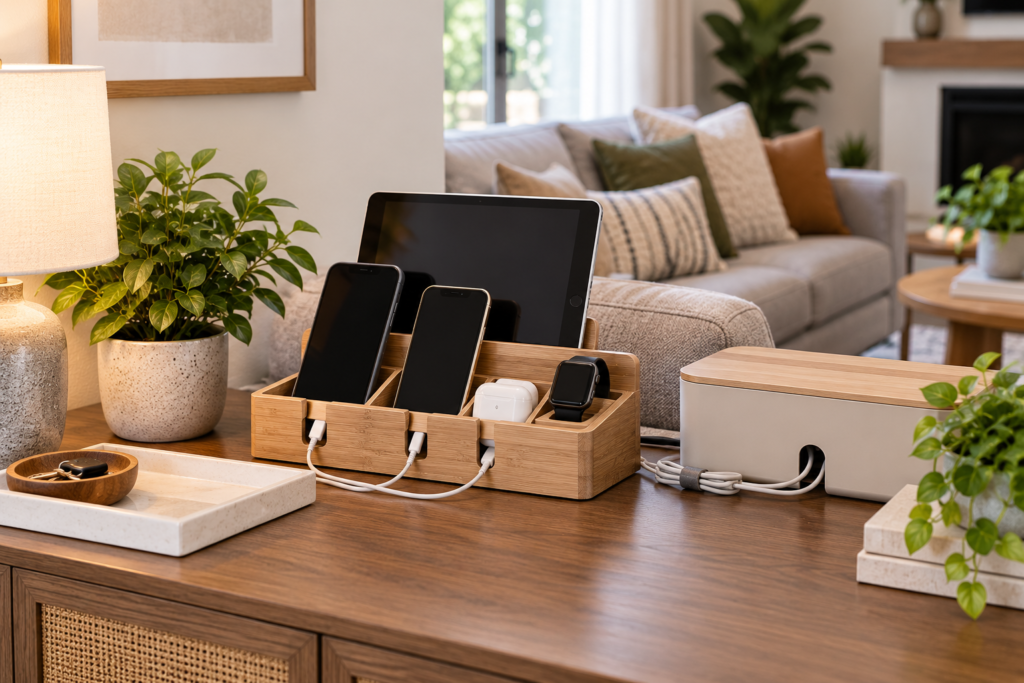
Living room charging station organization ideas can help control one of the most common sources of modern household clutter: phones, tablets, charging cables, adapters, and small electronic accessories scattered around sofas and side tables.
A useful charging area does not need to dominate the room. With the right location and a simple cable-management system, you can keep everyday devices accessible while maintaining a living room that still feels comfortable and organized.
The goal is not to hide every cable. Instead, create one predictable place where devices can charge safely and family members know where chargers belong after use.
Table of Contents
- Why Create an Organized Living Room Charging Station?
- 12 Living Room Charging Station Organization Ideas
- How to Choose the Right Charging Location
- How to Set Up a Practical Charging Station
- Charging Station Safety and Cable Management
- Common Charging Station Organization Mistakes
- Frequently Asked Questions
- Final Thoughts
Why Create an Organized Living Room Charging Station?
Without a dedicated charging location, cables often migrate between outlets, sofas, coffee tables, and other rooms. When someone needs a charger, the household ends up searching for the correct cable or adapter.
A designated charging station gives frequently used electronics one clear home. It can also prevent several charging cables from remaining permanently stretched across visible surfaces.
The system can be especially useful in shared living rooms where several people charge phones, tablets, headphones, watches, or other compatible devices.
If controllers and remotes are creating similar clutter nearby, our living room remote control storage ideas can help create a more organized electronics zone.
12 Living Room Charging Station Organization Ideas
1. Create a Charging Zone on a Console Table
A console table can provide an excellent location for a living room charging station, especially when an appropriate electrical outlet is nearby.
Use a small tray or organizer to define the charging area rather than allowing devices and cables to spread across the entire surface. Keep decorative items on the other side so the console remains part of the room rather than looking like an electronics workstation.
2. Use a Multi-Device Charging Organizer
A charging organizer with separate slots can keep compatible phones and tablets upright while they charge. This reduces the amount of surface area occupied by devices lying flat.
Before choosing one, check the dimensions of your devices and follow the charging equipment manufacturer’s compatibility and usage instructions.
3. Add Cable Clips to a Side Table
Cables frequently fall behind side tables when they are disconnected from a phone. Small cable clips can keep charging ends accessible near the edge of the furniture.
Position clips so cords remain convenient without crossing walking areas or creating unnecessary tension on the cable.
4. Use a Small Charging Tray
A simple tray can visually contain a phone, earbuds, smartwatch, and their charging accessories. This is one of the easiest living room charging station organization ideas because it requires very little setup.
Choose a tray that fits comfortably on the furniture while leaving enough open space for normal living room use.
5. Create a Drawer Charging Station
If a console or side table has a suitable drawer, it may provide a discreet location for storing charging accessories when they are not being used.
Do not improvise electrical modifications or route powered cables through furniture in ways that conflict with equipment instructions. If you want an integrated powered drawer, use a properly designed solution and follow its installation requirements.
6. Label Similar Charging Cables
When several cables look almost identical, small labels can make the charging station easier for everyone to use. Identify cables by device or connector type rather than repeatedly testing each one.
Keep labels short and easy to read. The purpose is quick identification, not creating another complicated organizational system.
7. Give Each Family Member a Device Slot
Shared charging areas can become crowded when several phones and tablets are placed together. Assigning each person a slot or section can reduce confusion.
This is particularly useful in households where similar devices or cases make phones difficult to distinguish at a glance.
8. Hide Excess Cable Length
Long charging cables can create visual clutter even when the devices themselves are neatly arranged. Manage only the unnecessary slack while leaving enough length for comfortable connection.
Use cable-management accessories designed for the purpose and avoid tightly bending, pinching, or damaging charging cords.
9. Use a Basket for Unplugged Chargers
Not every charger needs to remain connected all day. A small basket or compartment inside a nearby cabinet can hold spare cables and adapters that are used only occasionally.
This keeps the active charging station focused on everyday devices rather than turning it into storage for every electronic accessory in the home.
10. Keep the Charging Station Away from Sofa Cushions
Charging phones between cushions or leaving adapters hidden behind upholstered furniture can make cables difficult to see and manage.
A stable hard surface such as an appropriate table, console, or purpose-designed charging location creates a clearer and more manageable setup. Always follow device and charger manufacturer safety instructions.
11. Separate Charging Accessories from Remote Controls
Even if chargers and remote controls share the same console, give them different containers or zones. This prevents charging cables from wrapping around remotes and other small electronics.
A tray for charging devices and a separate remote holder can keep the entire area organized without requiring additional furniture.
12. Keep Only Active Chargers in the Living Room
Old adapters and unused cables tend to accumulate because they are small and easy to overlook. Review the charging station occasionally and remove equipment that is no longer part of your daily setup.
Store useful backups elsewhere and follow appropriate local electronics recycling guidance for unwanted electronic accessories rather than automatically placing them in household waste.
How to Choose the Right Charging Location
Start with the electrical outlet rather than the furniture. Look for a convenient location where compatible charging equipment can be used without stretching cables across walkways or creating a tripping hazard.
Next, think about how the living room is actually used. If phones are normally placed near the sofa, a nearby side table may be more practical than a charging station across the room.
For households charging several devices overnight, another room may be a better location for the primary charging station. Your living room station can then remain a smaller daytime setup.
Finally, make sure the charging area does not interfere with drinks, plants that require watering, or other activities that could expose electronics to moisture.
How to Set Up a Practical Charging Station
Begin by gathering the chargers currently used in the living room. Identify which cables and adapters belong to active devices and move unrelated or obsolete accessories elsewhere.
Choose one defined surface or organizer. Then arrange devices so each can be connected and removed without disturbing everything around it.
Manage unnecessary cable slack and label similar cords if needed. If several people use the station, make the system obvious enough that everyone can return chargers to the correct place.
After a few days, review the setup. If cables are still migrating around the room, the charging location may not be convenient enough for your household’s actual routine.
Charging Station Safety and Cable Management
Organization should never take priority over electrical safety. Use charging equipment that is appropriate for the device and follow the instructions supplied by the device and charger manufacturers.
Regularly inspect charging cords and adapters for visible damage. Do not continue using equipment with exposed conductors, damaged plugs, or other obvious defects.
Avoid creating arrangements that trap or damage cables, and keep charging electronics away from locations where liquids are likely to spill.
For general household electrical safety information, the U.S. Consumer Product Safety Commission provides electrical safety guidance. Product-specific instructions from the manufacturer should remain your primary reference for individual devices and charging equipment.
Common Charging Station Organization Mistakes
One common mistake is trying to charge every electronic device in the household from one small surface. This creates cable congestion and makes the station difficult to maintain.
Another mistake is keeping obsolete cables mixed with active chargers. If nobody knows what a cable belongs to, move it out of the everyday charging area until it can be identified.
Avoid placing a charging station where cords need to cross walking paths. Convenience is important, but the location should also work safely with the layout of the room.
Finally, do not buy a complicated organizer before understanding which devices actually need to charge there. A small tray and sensible cable management may be all your living room requires.
Frequently Asked Questions
Where should I put a charging station in my living room?
A side table or console near an appropriate outlet can work well. Choose a location that is convenient for normal device use without requiring cables to cross walkways or other busy areas.
How can I hide charging cables in a living room?
Use suitable cable clips, organizers, or furniture-based cable-management features to control unnecessary slack. Avoid routing cords in ways that could damage them or conflict with manufacturer instructions.
How do I organize multiple phone chargers?
Give each active cable a defined position and consider simple labels if connectors look similar. A multi-device organizer can also separate phones while they charge.
What should I do with extra charging cables?
Keep frequently used cables at the charging station and move useful backups to a separate electronics storage box or drawer. Review unidentified or obsolete cables instead of allowing them to accumulate indefinitely.
Can I keep a charging station inside a drawer?
A drawer can be useful for storing charging accessories. For powered charging inside furniture, use solutions specifically designed for that purpose and follow all manufacturer installation and ventilation instructions rather than improvising electrical modifications.
How can I make a charging station look less cluttered?
Limit it to active devices, manage excess cable length, use one appropriately sized tray or organizer, and move spare accessories elsewhere. Leaving some open space around the station helps it blend into the room.
Final Thoughts
The most useful living room charging station organization ideas create one predictable home for devices and their chargers without allowing electronics to dominate the room.
Start with a convenient location near an appropriate outlet, keep only active chargers there, and use simple trays, device slots, cable clips, or labels where they genuinely improve the setup.
A charging station that takes only a few seconds to use and reset is far more likely to stay organized.