
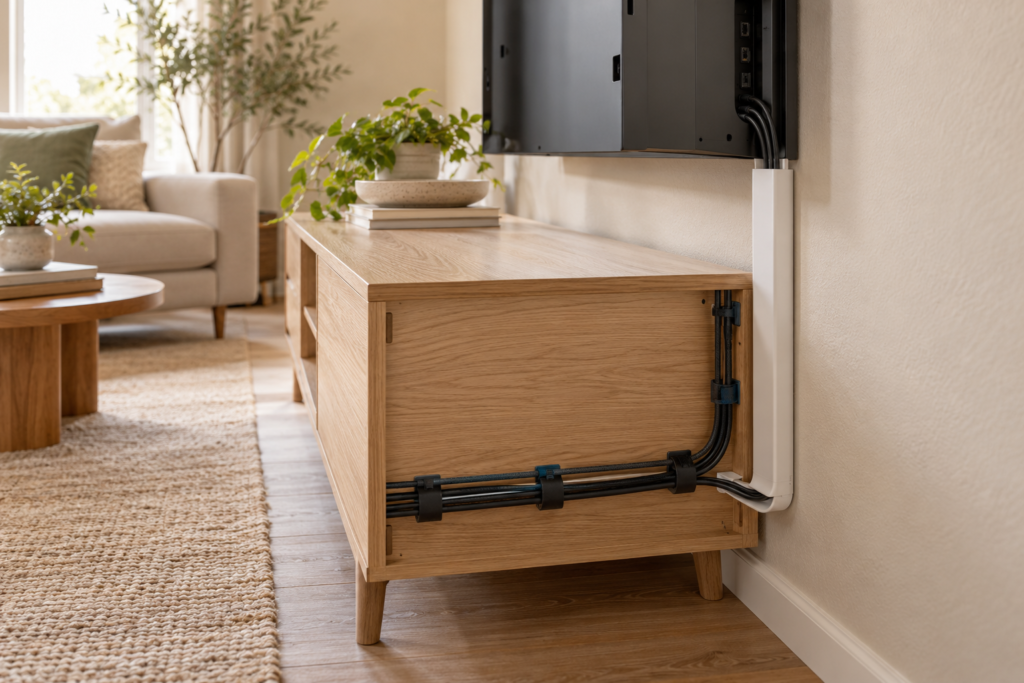
Loose charging cables, extension leads, and entertainment wires can make an otherwise tidy room feel unfinished. These living room cable management ideas hide visual clutter, keep connections easier to identify, and create a safer, more practical setup around televisions, consoles, lamps, and work areas.
Table of Contents
- Map Every Cable First
- Remove Unused Cords
- Use a Ventilated Cable Box
- Install a Paintable Cord Cover
- Route Cables Behind Furniture
- Add Adhesive Cable Clips
- Bundle Cords With Sleeves
- Label Both Ends
- Create a Charging Drawer
- Plan Wall-Mounted TV Wiring
- Use Power Equipment Safely
- Run a Quarterly Cable Check
1. Living Room Cable Management Ideas: Map Every Cable First
Before moving furniture or attaching clips, trace each cord from the device to its outlet or power source. Take a quick photo of the connections behind the television and note which cables must remain accessible. Planning first prevents accidental disconnection and shows where several cords can share one organized route.
2. Remove Unused Cords
Unplug cables that no longer serve a device, then store genuine spares in a labeled container outside the living room. Recycle damaged or obsolete electronics through an appropriate local program. Fewer cords make every later step easier and reduce the temptation to overload a power strip simply because an unused plug is still connected.
3. Use a Ventilated Cable Box
A cable-management box can conceal a power strip and excess cord length while allowing cables to exit through side openings. Choose a model with ventilation and enough internal room so plugs are not forced against one another. Place it where air can circulate and where children or pets cannot easily open or pull it.
4. Install a Paintable Cord Cover
A surface-mounted cord cover creates a neat route along a wall or baseboard. Select the correct size for the number of low-voltage cables, attach it according to the manufacturer’s instructions, and paint it to match the wall. Do not place power cords inside a product unless it is specifically rated for that purpose.
5. Route Cables Behind Furniture
Use the rear edges of consoles, bookcases, and side tables to keep cords outside the main sightline. Leave a small gap so furniture does not pinch plugs or cables against the wall. When arranging the room, these living room furniture arrangement ideas can help create better flow while preserving access to outlets.
6. Add Adhesive Cable Clips
Small clips can guide charging cords beneath a side table, behind a media console, or along the back of a desk. Clean and dry the surface before applying adhesive, and choose clips that hold the cable without crushing it. Add a little slack near each device so connectors are not pulled during everyday use.
7. Bundle Cords With Sleeves
A flexible sleeve combines several cords traveling in the same direction into one cleaner line. Spiral wraps allow cables to branch out at different points, while zippered sleeves are quick to reopen. Keep power and signal cables arranged according to equipment instructions, and never wrap damaged or hot cables.
8. Label Both Ends
Attach a small label near both ends of every important cable. Use simple names such as TV, Router, Console, Lamp, or Speaker rather than technical model numbers. Matching labels save time when troubleshooting and stop you from unplugging the wrong device. Colored tags can make categories even easier to recognize.
9. Create a Charging Drawer
A shallow drawer or ventilated basket near the sofa can hold phone, tablet, and headphone chargers. Use clips to keep connector ends from slipping backward, and unplug chargers that are not needed. If a drawer is used, follow the charger and furniture manufacturer’s ventilation guidance rather than enclosing equipment that becomes warm.
10. Plan Wall-Mounted TV Wiring
For a wall-mounted television, use a rated surface raceway or have appropriate in-wall wiring installed by a qualified professional. Never run ordinary detachable power cords through a wall. Keep the setup accessible for future upgrades and pair it with these living room wall storage ideas to organize remotes, consoles, and media accessories.
11. Use Power Equipment Safely
Use listed power strips and surge protectors according to their ratings and manufacturer instructions. Do not daisy-chain extension cords or power strips, and replace equipment with frayed insulation, loose plugs, scorch marks, or unusual heat. The Electrical Safety Foundation International provides guidance on understanding household electrical systems and using electricity safely.
12. Run a Quarterly Cable Check
Every few months, inspect cords behind furniture and entertainment units. Remove dust, check for pinching or abrasion, and confirm that adhesive clips still hold securely. Update labels whenever devices change. A short inspection prevents the system from slowly returning to a tangled, difficult-to-maintain bundle.
How Can You Hide Cords Without Blocking Access?
Use removable solutions in areas that change often and more permanent raceways only for stable routes. Keep plugs, switches, reset buttons, and ventilation openings accessible. Allow enough slack to move a device slightly without straining its connector, but secure excess length so it does not sit on the floor or create a trip hazard.
Plan Cable Routes Before Buying Covers
Identify every device, outlet, connection point, and ventilation area. Measure the required cable length along the proposed route without stretching it. Keep power and signal cables accessible enough to inspect, disconnect, and replace.
Scroll sideways to read the full table.
| Solution | Best use | Check first |
|---|---|---|
| Cable sleeve | Several flexible cords running together | Diameter and heat buildup |
| Wall raceway | Straight visible routes | Surface compatibility and access |
| Under-desk tray | Power strip and adapter control | Load, ventilation, and fixing |
| Reusable ties | Short service loops | Do not overtighten |
Keep Power Management Safe
Do not place cords under rugs, across walkways, through door pinch points, or against heat sources. Avoid tightly coiling power cables or enclosing adapters without ventilation. Follow device and power-strip guidance, and consult a qualified electrician when outlets or permanent wiring need changes.
Label Both Ends
Use simple labels such as TV, router, lamp, or console at both ends. Leave a small service loop so equipment can move without pulling the plug.
Cable-Management Questions
Can power and data cables share one cover?
Follow equipment and local electrical guidance; separation may reduce interference and simplify servicing.
How do I manage cables in a rental?
Choose removable systems compatible with the surface and agreement, and test them in an inconspicuous area.
What is the first cable to remove?
Disconnect and responsibly handle any cable that no longer serves a device.
Common Cable Errors
- Running cords under rugs or across doorways.
- Bundling adapters where heat cannot escape.
- Using ties so tightly that cable jackets are stressed.
- Hiding every connection so maintenance becomes difficult.
- Keeping unidentified cables after the device is gone.
Photograph the final connections before closing a media cabinet; the record makes future troubleshooting faster without adding permanent labels to equipment.
Recheck the route whenever equipment changes. A removed console, new router, or moved lamp can leave unnecessary cords or create a new pinch point, so cable management should evolve with the devices.
Final Thoughts
The best living room cable management ideas balance appearance, access, and electrical safety. Begin by mapping and reducing the cables, then guide remaining cords with boxes, covers, clips, sleeves, and clear labels. A tidy setup should make maintenance easier—not hide damage or place equipment where heat cannot escape.